The Uttar Pradesh Public Service Commission (UPPSC) has released the UP LT Grade Teacher Admit Card 2026 for the Assistant Teacher (Trained Graduate Grade) recruitment (Advt. No. A-5/E-1/2025). Admit cards for the subjects scheduled on 17 and 18 January 2026 were published on 8 January 2026, and candidates can download their hall tickets from the official UPPSC portal.
This article walks you through everything: where to download the admit card, step-by-step instructions, the exact information printed on the hall ticket, exam-day rules, helpful troubleshooting, and trusted sources to follow for updates.
Why this admit card matters
Your admit card is the single most important document for exam day — it proves your candidature, gives your exam centre and shift, and lists vital instructions you must follow. Without a valid printed admit card plus a photo ID, entry to the exam hall will be refused.
Official release & which sessions are live now
Admit Card Release Date: 08 January 2026.
Published For: Subjects scheduled on 17 & 18 January 2026 (examples: Social Science, Biology on 17 Jan; English, Physical Education on 18 Jan).
Advertisement/Recruitment: Assistant Teacher (Trained Graduate Grade) — Advt. No. A-5/E-1/2025; total vacancies reported ~7,466 across multiple subject posts.
If your exam date is later (other December/January windows), UPPSC will upload admit cards for those dates as per the schedule — check the official portal regularly.
Where to download the UP LT Grade Teacher Admit Card 2026
The admit card must be downloaded from the official UPPSC website:
Official portal: uppsc.up.nic.in — look for the “Download Admit Card” / “What’s New” section and the link for Advertisement A-5/E-1/2025.
Pro tip: Always download directly from UPPSC. Third-party mirrors or social pages sometimes host outdated links or mirror PDFs that may not reflect last-minute centre changes.
Step-by-step: How to download your admit card
Open the official UPPSC website: uppsc.up.nic.in.
On the homepage, find the notice or link for “Admit Card — Advt. No. A-5/E-1/2025 (Assistant Teacher, Trained Graduate Grade)”.
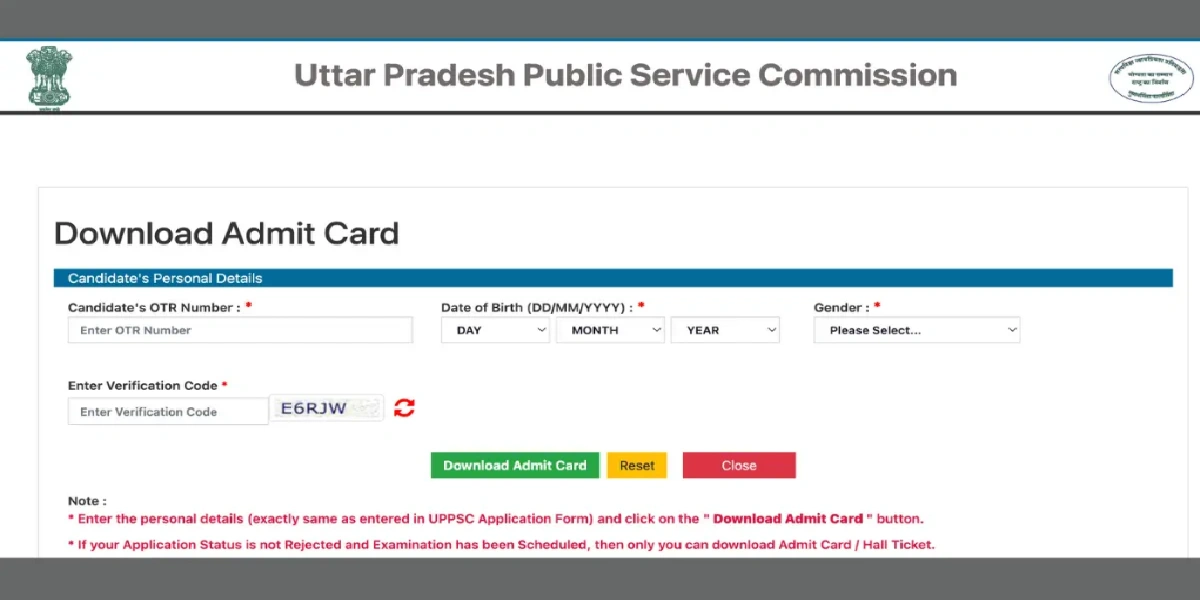
Click the “Download Admit Card” link — this will take you to a login page.
Enter your Registration/OTR Number and Date of Birth / Password (and captcha if displayed).
Verify details on-screen, download the PDF, and print multiple copies (one to carry to the exam; one backup).
What details are printed on the admit card
When you open the PDF, verify the following critical entries:
Candidate’s full name and photograph
Registration / Roll / OTR number
Exam date, shift and reporting time
Exam centre name and full address (with centre code)
Subject name and paper code
Examination day instructions and items allowed/prohibited
Signature / stamp of the issuing authority (if present)
If any personal detail or exam centre information is incorrect, contact UPPSC immediately using the helpline details on the portal.
Conclusion
If you’re appearing in the UP LT Grade Teacher exam, the UP LT Grade Teacher Admit Card 2026 released on 8 January 2026 is your immediate priority. Download from the official UPPSC portal, check every detail carefully, carry the required documents, and arrive early at your exam centre. Bookmark the official UPPSC page and one trusted education portal for updates. Good luck — and stay calm on exam day!
Read also : MPSC Group A Group B Combined Pre Examination 2026